
This is a practical BOSS Solution guide for organisations that want to improve website security with clear ownership and measurable steps. Start by defining the audience and the outcome; then make a small change that can be reviewed before expanding it.
Start with the real need
Updates can fix known defects, but an untested change may also interrupt a site. Inventory the content system, themes, extensions and server components, then assign an owner to review security notices and compatibility. Record the current process, the people affected and any technical or budget limits. A useful baseline helps the team distinguish a genuine improvement from a change that merely looks busy.
A practical workflow
- Write down the intended result and who is responsible for approving the work.
- Back up before a significant update, test on staging when available, apply one change set at a time and check forms, checkout and sign-in afterward. Remove abandoned extensions that are no longer needed.
- Test the change with a limited, representative example and protect any customer or account information.
- Document the result, the fallback plan and the next review date before rolling the change out more widely.
Plan for Bangladesh-based visitors and teams
Review access, software updates and recovery options together; one control cannot replace a complete security process. Check the experience on a common mobile device, use clear English or Bangla where appropriate, and provide a working route for questions. Do not promise delivery, availability or a result that depends on a third party or an unverified setting.
Measure and improve
Track Updates completed, known vulnerabilities and post-update checks. Review the measure alongside customer feedback, operating effort and any error reports. If the result is unclear, adjust one part of the process at a time and keep the earlier version available for comparison.
How BOSS Solution can help
BOSS Solution offers domain, hosting and digital services for businesses in Bangladesh. Service features depend on the selected plan and account. Contact the team with the page or service involved, the exact symptom and the steps already tried; never include passwords, payment details or recovery codes.
BOSS Solution provides domain, web hosting and digital services in Bangladesh. Review current service details at https://boss.com.bd or contact support@boss.com.bd for account-specific assistance. Do not send passwords or recovery codes by email.
Image attribution:
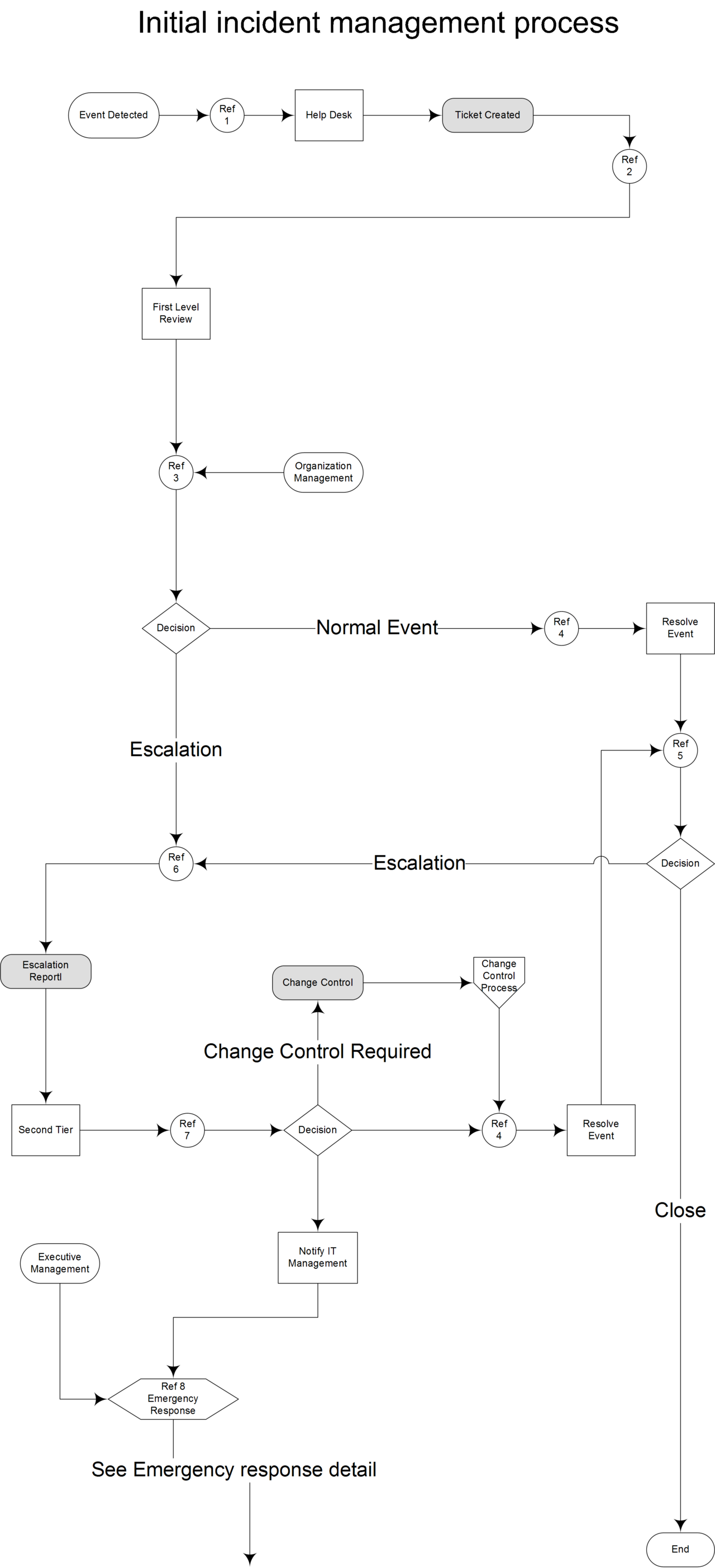
Michael Berman User:tanjstaffl, "File:Computer-security-incident-initial-process(high-res).png" (CC BY 2.5). Source: https://commons.wikimedia.org/wiki/File%3AComputer-security-incident-initial-process(high-res).png; license: https://creativecommons.org/licenses/by/2.5.
এই BOSS Solution নির্দেশিকা ওয়েবসাইট নিরাপত্তা উন্নত করার বাস্তবধর্মী উপায় তুলে ধরে। আগে পাঠক ও প্রত্যাশিত ফল নির্ধারণ করুন; এরপর বিস্তারের আগে পর্যালোচনা করা যায়—এমন ছোট পরিবর্তন করুন।
বাস্তব প্রয়োজন দিয়ে শুরু করুন
update পরিচিত ত্রুটি ঠিক করতে পারে, তবে পরীক্ষা ছাড়া পরিবর্তনে সাইট বিঘ্নিতও হতে পারে। content system, theme, extension ও server component-এর তালিকা করে security notice ও compatibility দেখার দায়িত্ব দিন। বর্তমান প্রক্রিয়া, কারা প্রভাবিত হন এবং প্রযুক্তি বা বাজেটের সীমা লিখে রাখুন। প্রাথমিক অবস্থা নথিবদ্ধ থাকলে প্রকৃত উন্নতি ও শুধু ব্যস্ততা বাড়ানো পরিবর্তন আলাদা করা যায়।
ধাপে ধাপে কাজের পদ্ধতি
- কাঙ্ক্ষিত ফল এবং কাজ অনুমোদনের দায়িত্ব কার—তা লিখুন।
- গুরুত্বপূর্ণ update-এর আগে backup নিন, staging থাকলে পরীক্ষা করুন, একবারে একটি change set প্রয়োগ করুন এবং পরে form, checkout ও sign-in দেখুন। পরিত্যক্ত extension সরান।
- সীমিত ও প্রতিনিধিত্বমূলক উদাহরণে পরিবর্তন পরীক্ষা করুন এবং গ্রাহক বা account-এর তথ্য সুরক্ষিত রাখুন।
- বিস্তৃতভাবে প্রয়োগের আগে ফল, বিকল্প ব্যবস্থা ও পরবর্তী review-এর তারিখ নথিবদ্ধ করুন।
বাংলাদেশি দর্শক ও দলের অভিজ্ঞতা
অ্যাক্সেস, সফটওয়্যার আপডেট ও পুনরুদ্ধারের ব্যবস্থা একসঙ্গে পর্যালোচনা করুন; একটি নিয়ন্ত্রণ পূর্ণ নিরাপত্তা প্রক্রিয়ার বিকল্প নয়। প্রচলিত mobile device-এ ব্যবহার পরীক্ষা করুন, প্রয়োজনমতো স্পষ্ট বাংলা বা ইংরেজি দিন এবং প্রশ্ন করার কার্যকর পথ রাখুন। তৃতীয় পক্ষ বা যাচাই না করা setting-এর ওপর নির্ভর করে—এমন ফল, availability বা delivery-এর নিশ্চয়তা দেবেন না।
ফল মেপে উন্নতি করুন
সম্পন্ন update, পরিচিত vulnerability ও update-পরবর্তী পরীক্ষা এই মাপের সঙ্গে গ্রাহকের মতামত, পরিচালনার শ্রম ও error report-ও পর্যালোচনা করুন। ফল পরিষ্কার না হলে একবারে একটি ধাপ বদলান এবং তুলনার জন্য আগের সংস্করণ রাখুন।
BOSS Solution কীভাবে সহায়তা করতে পারে
BOSS Solution বাংলাদেশের ব্যবসার জন্য domain, hosting ও digital service দেয়। feature নির্দিষ্ট plan ও account অনুযায়ী ভিন্ন হতে পারে। সহায়তা চাইলে page বা service, সঠিক সমস্যা এবং ইতিমধ্যে নেওয়া পদক্ষেপ জানান; password, payment detail বা recovery code দেবেন না।
BOSS Solution বাংলাদেশে domain, web hosting ও digital service প্রদান করে। বর্তমান service detail দেখতে https://boss.com.bd দেখুন; account-নির্দিষ্ট সহায়তায় support@boss.com.bd-এ যোগাযোগ করুন। email-এ password বা recovery code পাঠাবেন না।
ছবির স্বীকৃতি:
Michael Berman User:tanjstaffl, "File:Computer-security-incident-initial-process(high-res).png" (CC BY 2.5). Source: https://commons.wikimedia.org/wiki/File%3AComputer-security-incident-initial-process(high-res).png; license: https://creativecommons.org/licenses/by/2.5.